Drop Down MenusCSS Drop Down MenuPure CSS Dropdown Menu

Saturday, March 2, 2013

Free !! Free!! Free !! Microsoft professional-level developer and designer tools at no cost

Hi All,

Microsoft  all about giving students Microsoft professional-level developer and designer tools at no cost so that students can chase their dreams and create the next big breakthrough in technology - or just get a head start on their career.

Microsoft helps educators teach the latest technologies and experiment in research. Microsoft knows that to make learning more motivating, relevant, and engaging for today's students requires a diverse set of resources. Microsoft gives educators the resources to ensure their classrooms always have the latest technologies to challenges, motivate, and keep students engaged in new ways.

Microsoft is also a subscription for Academic Institutions: it provides a cost-effective way to put Microsoft developer tools, platforms and servers in labs and classrooms, and on their students' and faculty's computers for learning and research purposes. It reduces lab costs and teaching budgets.

Free !! Free !! Free!!!

 Create Account and download all latest Microsoft software  More Info : https://www.dreamspark.com/Student/Software-Catalog.aspx


Windows Phone and Windows Store Certification details


-
 
-- Thanks & Regards
      Suthahar.J

Tuesday, October 9, 2012

Activate Windows 8 or Other Product Key To Complete Activation

Follow below steps
 
Start   ==>   CMD  ==> right Click ==> Choose Run at Administrator
 
 
Type Following Command
 
 
Slui 3
 
after press ENTER
 
window pop us now you can put Windows product Key


Wednesday, August 29, 2012

Design Cross-browser using Modernizr - Modernizr is a JavaScript library that detects HTML5 and CSS3 features in the user’s browser. http://modernizr.com/


Modernizr is a JavaScript library that detects HTML5 and CSS3 features in the user's browser.

Why use Modernizr?

Taking advantage of cool new web technologies is great fun, until you have to support browsers that lag behind. Modernizr makes it easy for you to write conditional JavaScript and CSS to handle each situation, whether a browser supports a feature or not. It's perfect for doing progressive enhancement easily.

Saturday, August 25, 2012

Sending Email using gmail

Sending Email:


NameSpace:


using System.Net.Mail;


Coding:


MailMessage om = new MailMessage("suthahar@gmail.com", "jssuthahar@gmail.com");

//om.CC

//  om.Bcc

om.Subject = "Welcome to  Suthahar bogs";

om.Body = value;

om.IsBodyHtml = true;

om.Priority=MailPriority.High;

SmtpClient os=new SmtpClient();

os.Host = "smtp.gmail.com";

os.Credentials=new System.Net.NetworkCredential("suthaharmcpd@gmail.com","*******");

os.EnableSsl = true;

os.Send(om);

Response.Write("<script>alert('mail send')</script>");


Monday, July 23, 2012

IsolatedStorageSettings in Windows Phone


IsolatedStorageSettings


Save Data Into Setting:

/// <summary>

/// Save Value into Setting File

/// </summary>

/// <param name="sender"></param>

/// <param name="e"></param>

private void button1_Click(object sender, RoutedEventArgs e)

{

IsolatedStorageSettings.ApplicationSettings.Add("Email", txtname.Text);


}

Retrieve Data from Setting:

/// <summary>

/// Retrieve Value from Setting file

/// </summary>

/// <param name="sender"></param>

/// <param name="e"></param>

private void button2_Click(object sender, RoutedEventArgs e)

{


if (IsolatedStorageSettings.ApplicationSettings.Contains("Email") == true)

{

txtemail.Text = IsolatedStorageSettings.ApplicationSettings["Email"].ToString();

}

else

{

MessageBox.Show("Value not found");

}

}


Save Object into Setting:

/// <summary>

/// Class have two property

/// </summary>

public class Student

{


public string Name { get; set; }

public string email { get; set; }


}

/// <summary>

/// Store object into Setting

/// </summary>

/// <param name="sender"></param>

/// <param name="e"></param>

private void button1_Click_1(object sender, RoutedEventArgs e)

{

Student os = new Student { Name = txtname.Text, email = txtemail.Text };

IsolatedStorageSettings.ApplicationSettings.Add("Stud", os);

}

Retieve Object from setting

/// <summary>

/// Retrieve Object from Setting

/// </summary>

/// <param name="sender"></param>

/// <param name="e"></param>

private void button2_Click_1(object sender, RoutedEventArgs e)

{

Student os;

IsolatedStorageSettings.ApplicationSettings.TryGetValue<Student>("Stud", out os);

txtname.Text = os.Name;

txtemail.Text = os.email;

}


Data Binding

Student os;

IsolatedStorageSettings.ApplicationSettings.TryGetValue<Student>("Stud", out os);

txtname.Text = os.Name;

txtemail.Text = os.email;

this.DataContext = os;


<TextBlock  Height="39" HorizontalAlignment="Left" Margin="90,439,0,0" Name="txtbname" Text="{Binding Name}" VerticalAlignment="Top" Width="251" />

<TextBlock Height="36" HorizontalAlignment="Left" Margin="90,509,0,0" Name="txtbemail" Text="{Binding email}" VerticalAlignment="Top" Width="263" />


Saturday, July 21, 2012

Windows Mobile Isolated Storage Beginners


WP7 Isolated Storage
●Isolated storage is used to store local text file a on Windows Phone 7
●If you know File concept in C#.net its easy for you
●If you have two applications that work with the same data. data you can't share. You
can use web service/WCF for sharing data
●Windows Phone applications do not have an imposed quota size because the
requirements for each application's scenario are different. So storage resources on
a phone are limited so applications should only store necessary data. When a
Windows Phone has only 10% of storage space remaining, user will receive
notification
●Isolated storage Action
➔Create File
➔Read File
➔Delete File
➔Create Folder
➔Delete Folder
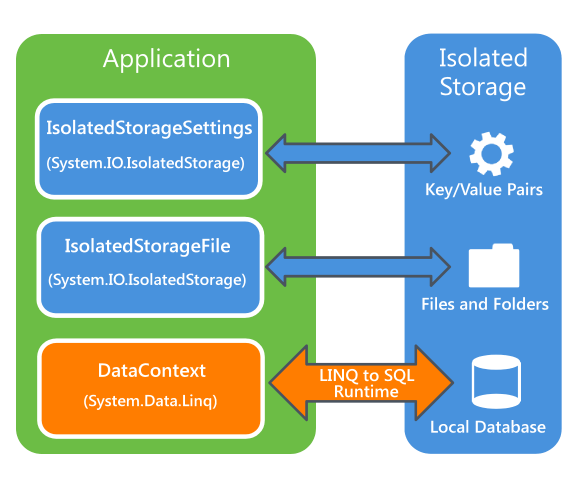
Silverlight Windows Phone store following way
●Settings: Store data as key/value pairs by using the IsolatedStorageSettings class.
●Files and folders: Store files and folders by using the IsolatedStorageFile class.
●Relational data: Store relational data in a local database by using LINQ to SQL.
How to take Backup isolated Storage :
Name Space:
using System.IO;
using System.IO.IsolatedStorage
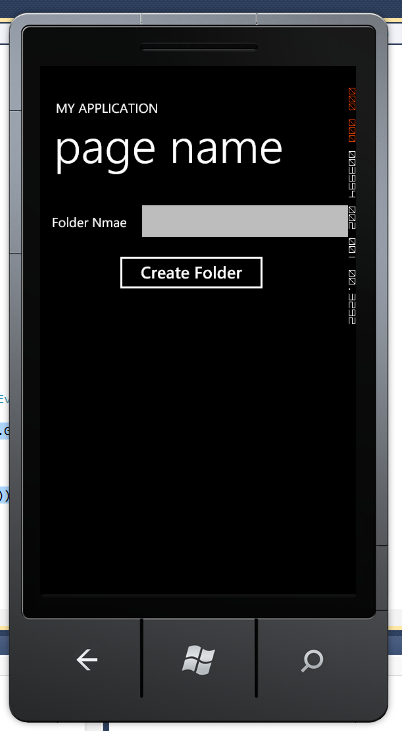
Create Directory:
Code:
IsolatedStorageFile os = IsolatedStorageFile.GetUserStoreForApplication();
os.CreateDirectory(<dirname>);   //
//List of Directory Name
foreach (object dir in os.GetDirectoryNames())
{
MessageBox.Show(dir.ToString());
}
Screen:
   // Delete Directory
    os.DeleteDirectory(txtdirname.Text);
//Check Directory is exists
            if (os.DirectoryExists(txtdirname.Text) == true)
            {
                MessageBox.Show("Hi directory avl");
            }
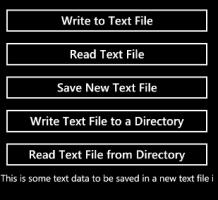
  //Create File
IsolatedStorageFile os = IsolatedStorageFile.GetUserStoreForApplication();
StreamWriter osw=new StreamWriter(new
IsolatedStorageFileStream("js.txt",FileMode.CreateNew,os);
//create File and Save data
IsolatedStorageFile os = IsolatedStorageFile.GetUserStoreForApplication();
StreamWriter osw=new StreamWriter(new
IsolatedStorageFileStream("js1.txt",FileMode.Create,os));
osw.Write("hi welcome");
osw.Flush();
            osw.Close();
//Replace File :
IsolatedStorageFile os = IsolatedStorageFile.GetUserStoreForApplication();
StreamWriter osw = new StreamWriter(os.OpenFile("js1.txt",
FileMode.Open,FileAccess.Write));
osw.Write("hi welcome");
osw.Flush();
osw.Close();
//Read Data:
IsolatedStorageFile os = IsolatedStorageFile.GetUserStoreForApplication();
StreamReader osr = new StreamReader(os.OpenFile("js1.txt", FileMode.Open,
FileAccess.Read));
txtdirname.Text = osr.ReadToEnd();
osr.Close();