Drop Down MenusCSS Drop Down MenuPure CSS Dropdown Menu

Saturday, July 21, 2012

Windows Mobile Isolated Storage Beginners


WP7 Isolated Storage
●Isolated storage is used to store local text file a on Windows Phone 7
●If you know File concept in C#.net its easy for you
●If you have two applications that work with the same data. data you can't share. You
can use web service/WCF for sharing data
●Windows Phone applications do not have an imposed quota size because the
requirements for each application's scenario are different. So storage resources on
a phone are limited so applications should only store necessary data. When a
Windows Phone has only 10% of storage space remaining, user will receive
notification
●Isolated storage Action
➔Create File
➔Read File
➔Delete File
➔Create Folder
➔Delete Folder
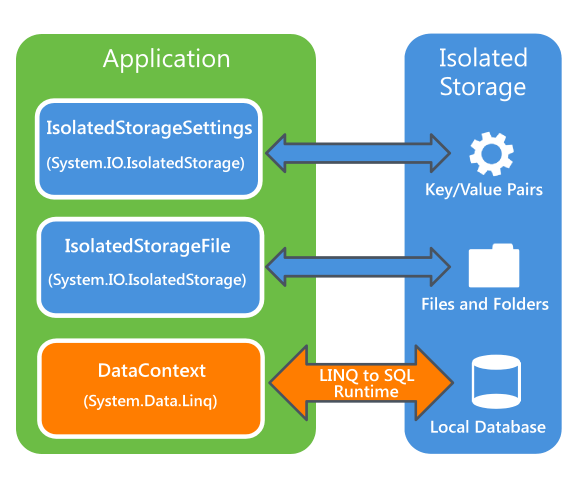
Silverlight Windows Phone store following way
●Settings: Store data as key/value pairs by using the IsolatedStorageSettings class.
●Files and folders: Store files and folders by using the IsolatedStorageFile class.
●Relational data: Store relational data in a local database by using LINQ to SQL.
How to take Backup isolated Storage :
Name Space:
using System.IO;
using System.IO.IsolatedStorage
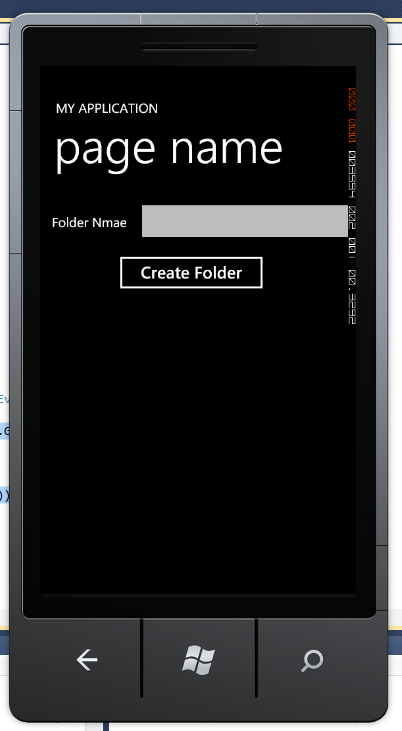
Create Directory:
Code:
IsolatedStorageFile os = IsolatedStorageFile.GetUserStoreForApplication();
os.CreateDirectory(<dirname>);   //
//List of Directory Name
foreach (object dir in os.GetDirectoryNames())
{
MessageBox.Show(dir.ToString());
}
Screen:
   // Delete Directory
    os.DeleteDirectory(txtdirname.Text);
//Check Directory is exists
            if (os.DirectoryExists(txtdirname.Text) == true)
            {
                MessageBox.Show("Hi directory avl");
            }
  //Create File
IsolatedStorageFile os = IsolatedStorageFile.GetUserStoreForApplication();
StreamWriter osw=new StreamWriter(new
IsolatedStorageFileStream("js.txt",FileMode.CreateNew,os);
//create File and Save data
IsolatedStorageFile os = IsolatedStorageFile.GetUserStoreForApplication();
StreamWriter osw=new StreamWriter(new
IsolatedStorageFileStream("js1.txt",FileMode.Create,os));
osw.Write("hi welcome");
osw.Flush();
            osw.Close();
//Replace File :
IsolatedStorageFile os = IsolatedStorageFile.GetUserStoreForApplication();
StreamWriter osw = new StreamWriter(os.OpenFile("js1.txt",
FileMode.Open,FileAccess.Write));
osw.Write("hi welcome");
osw.Flush();
osw.Close();
//Read Data:
IsolatedStorageFile os = IsolatedStorageFile.GetUserStoreForApplication();
StreamReader osr = new StreamReader(os.OpenFile("js1.txt", FileMode.Open,
FileAccess.Read));
txtdirname.Text = osr.ReadToEnd();
osr.Close();

Wednesday, July 11, 2012

What's New in Visual Studio 2012 RC

You can find VS 2012/vs 11 new feature here

VS2011 /VS11 Download


Hi,

VS 2011 /VS 11 now available you can download here


Tuesday, March 20, 2012

Watch Tech Ed on Live ... Click Here

Hi,


Watch Tech Ed  on Live ... Click Here


Topic below...


DayTimeTopic
Day 2, March 22, 2012Windows 8 - Attend to find out
Day 3, March 23, 2012Keynote - Chakrapani Gollapali
Day 3, March 23, 2012Keynote - Gerard Rego
Day 1, March 21, 2012Windows Server 8 - Attend to find out
Day 2, March 22, 2012System Center 2012: How It Enables Building Private Cloud
Day 2, March 22, 2012Windows 8 - Attend to find out
Day 2, March 22, 2012System Center 2012: Application Management in Private and Public Clouds
Day 1, March 21, 2012Windows 8 - Attend to find out
Day 3, March 23, 2012Speed Up! - Parallel Processes and Unparalleled Performance
Day 3, March 23, 2012Keynote - Gerard Rego
Day 3, March 23, 2012Top five reasons why you want SQL Server 2012 BI
Day 1, March 21, 2012Windows 8 - Attend to find out
Day 2, March 22, 2012System Center 2012: Technical Overview
Day 1, March 21, 2012Windows Server 8 - Attend to find out
Day 3, March 23, 2012ASP.NET Web Standards and Performance with IIS 8
Day 1, March 21, 2012Keynote - Sanket Akerkar
Day 1, March 21, 2012Windows Server 8 - Attend to find out
Day 1, March 21, 2012Windows 8 - Attend to find out
Day 3, March 23, 2012Keeping Your Database Available - 'AlwaysOn'
Day 3, March 23, 2012Hello from ASP.NET Web Forms 4.5 and Visual Studio 11
Day 2, March 22, 2012System Center 2012: Application and Network Monitoring in your Private Cloud
Day 1, March 21, 2012Keynote - Bernardo Caldas
Day 3, March 23, 2012Peeling SQL Server like an Onion: Internals Debunked
Day 1, March 21, 2012Keynote - Sanket Akerkar
Day 1, March 21, 2012Windows Server 8 - Attend to find out
Day 2, March 22, 2012System Center 2012: Service Delivery and Automation using Orchestrator and Service Manager
Day 2, March 22, 2012Keynote - Amit Chatterjee
Day 3, March 23, 2012Using HTML5 to enhance your web applications today
Day 1, March 21, 2012Windows 8 - Attend to find out
Day 2, March 22, 2012Windows 8 - Attend to find out
Day 3, March 23, 2012Building connected web applications that extend across boundaries
Day 3, March 23, 2012Building an app for the Web, Mobile and Touch Devices within an hour using ASP.NET MVC 4
Day 3, March 23, 2012Keynote - Chakrapani Gollapali
Day 3, March 23, 2012Lesser Known Facts of SQL Server Backup and Restore
Day 2, March 22, 2012Keynote - Amit Chatterjee
Day 1, March 21, 2012Keynote - Bernardo Caldas
Day 1, March 21, 2012Windows Server 8 - Attend to find out


Thursday, March 15, 2012

Microsoft TechEd India 2012

Welcome to the largest technology event in India -- Microsoft TechEd India 2012. 

Register now to attend the conference for hands-on learning, 

deep product exploration and opportunities to connect with industry and Microsoft experts one-to-one.


Wednesday, February 8, 2012

Override Inline Styles with CSS [ !important ]

Cascading Style Sheets cascade. This means that the styles are applied in order as they are read by the browser. The first style is applied and then the second and so on. What this means is that if a style appears at the top of a style sheet and then is changed lower down in the document, the second instance of that style will be the one applied, not the first.

 For example, in the following style sheet, the paragraph text will be black, even though the first style property applied is red:

p { color: #ff0000; }
 p { color: #000000; }

The !important rule is a way to make your CSS cascade but also have the rules you feel are most crucial always be applied. A rule that has the !important property will always be applied no matter where that rule appears in the CSS document.


 So if you wanted to make sure that a property always applied, you would add the !important property to the tag. So, to make the paragraph text always red, in the above example, you would write:

Single Property Set two Different style . you can use  !importan  ( override  style)

p { color: #ff0000 !important; }
 p { color: #000000; }

Changing Team Foundation Server Credentials

You connect to TFS from the standard Visual Studio Team Explorer it remembers the credentials used to connect to the server. 


1.To clear the credential cache  Start ==> Run  ==>control userpasswords2  ==>Press Enter Key


Click Advance Tab


Click Managed Password


Click Remove from Vault


Enjoy .... :)